

ZArchiver Donate APK (Full)
Updated
2026-09-12
Version
1.0.10
System
Android
Category
Tools
Price
Free
Download APK
Fast Download : Download this app by PureMods App with faster speed.
Full
ZArchiver Donate - a special version of ZArchiver for donating to project.
Warning! Unfortunately, Google has stopped processing payments for developers from Russia for an indefinite period of time. It is impossible to purchase this application. You can find out about other ways to support the project on the website: zdevs.ru
Advantages of Pro version:
- Light and dark theme;
- Password storage;
- Image preview in archive;
- Editing the files in the archive (see notes);
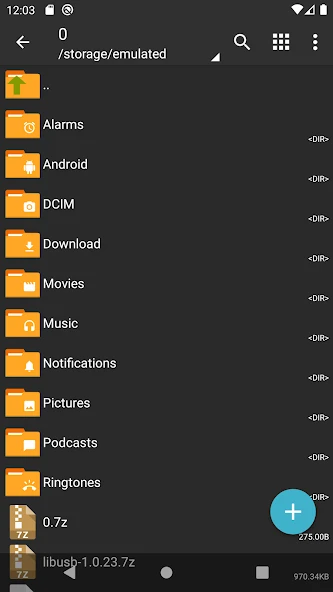
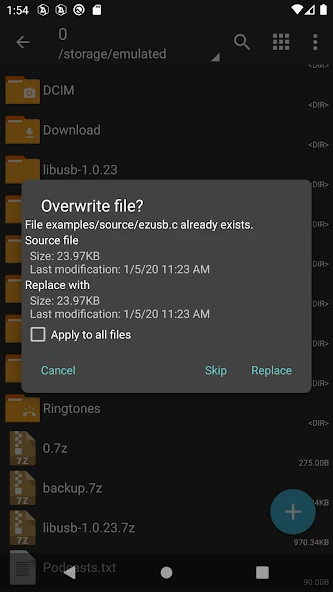
ZArchiver - is a program for archive management (including managing backup applications in archives). It has a simple and functional interface. The app doesn't have permission to acces the internet, so cannot transmit any information to other services or persons.
ZArchiver lets you:
- Create the following archive types: 7z (7zip), zip, bzip2 (bz2), gzip (gz), XZ, lz4, tar, zst (zstd);
- Decompress the following archive types: 7z (7zip), zip, rar, rar5, bzip2, gzip, XZ, iso, tar, arj, cab, lzh, lha, lzma, xar, tgz, tbz, Z, deb, rpm, zipx, mtz, chm, dmg, cpio, cramfs, img (fat, ntfs, ubf), wim, ecm, lzip, zst (zstd), egg, alz;
- View archive contents: 7z (7zip), zip, rar, rar5, bzip2, gzip, XZ, iso, tar, arj, cab, lzh, lha, lzma, xar, tgz, tbz, Z, deb, rpm, zipx, mtz, chm, dmg, cpio, cramfs, img (fat, ntfs, ubf), wim, ecm, lzip, zst (zstd), egg, alz;
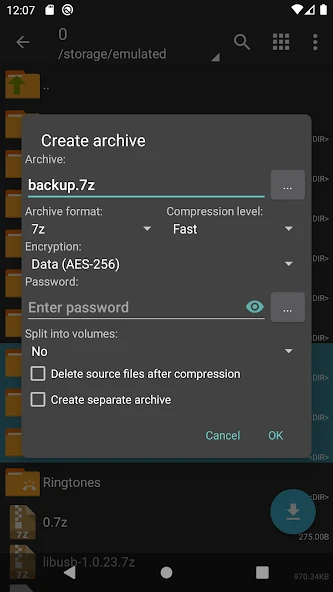
- Create and decompress password-protected archives;
- Edit archives: add/remove files to/from the archive (zip, 7zip, tar, apk, mtz);
- Create and decompress multi-part archives: 7z, rar(decompress only);
- Install APK and OBB file from backup (archive);
- Partial archive decompression;
- Open compressed files;
- Open an archive file from mail applications;
- Extract split archives: 7z, zip and rar (7z.001, zip.001, part1.rar, z01);
Particular properties:
- Start with Android 9 for small files (<10MB). If possible, use direct opening without extracting to a temporary folder;
- Multithreading support (useful for multicore processors);
- UTF-8/UTF-16 support for filenames allows you to use national symbols in filenames.
ATTENTION! Any useful ideas or wishes are welcome. You can send them by email or just leave a comment here.
Notes:
File modification in the archive it is the ability to update the file in the archive after changing it in an external program. To do this: open the file from the archive, select the application (if required), edit the file, save the changes, return to ZArchiver. You will be prompted to update the file in the archive when you return to ZArchiver. If for some reason you are not prompted to update the file, the modified file can be found on the memory card in the folder Android/ru.zdevs.zarchiver.pro/temp/.
Mini FAQ:
Q: What password?
A: The contents of some archives may be encrypted and the archive can only be opened with the password (don't use the phone password!).
Q: The program is not working correctly?
A: Send me an email with detailed description of the problem.
Q: How to compress files?
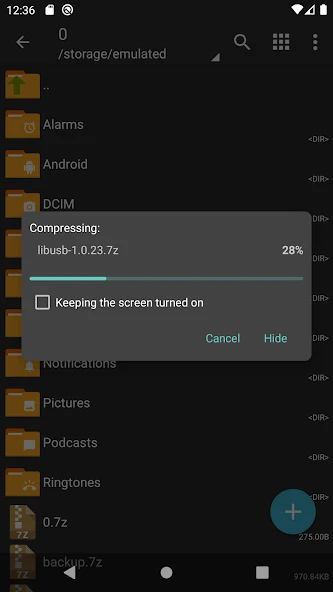
A: Select all the files you want to compress by clicking on icons (from the left of filenames). Click on the first of selected files and choose "Compress" from menu. Set desired options and press the OK button.
Q: How to extract files?
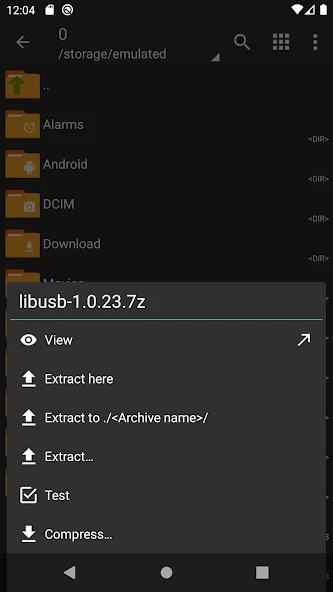
A: Click on the archive name and select suitable options ("Extract Here" or other).
Warning! Unfortunately, Google has stopped processing payments for developers from Russia for an indefinite period of time. It is impossible to purchase this application. You can find out about other ways to support the project on the website: zdevs.ru
Advantages of Pro version:
- Light and dark theme;
- Password storage;
- Image preview in archive;
- Editing the files in the archive (see notes);
ZArchiver - is a program for archive management (including managing backup applications in archives). It has a simple and functional interface. The app doesn't have permission to acces the internet, so cannot transmit any information to other services or persons.
ZArchiver lets you:
- Create the following archive types: 7z (7zip), zip, bzip2 (bz2), gzip (gz), XZ, lz4, tar, zst (zstd);
- Decompress the following archive types: 7z (7zip), zip, rar, rar5, bzip2, gzip, XZ, iso, tar, arj, cab, lzh, lha, lzma, xar, tgz, tbz, Z, deb, rpm, zipx, mtz, chm, dmg, cpio, cramfs, img (fat, ntfs, ubf), wim, ecm, lzip, zst (zstd), egg, alz;
- View archive contents: 7z (7zip), zip, rar, rar5, bzip2, gzip, XZ, iso, tar, arj, cab, lzh, lha, lzma, xar, tgz, tbz, Z, deb, rpm, zipx, mtz, chm, dmg, cpio, cramfs, img (fat, ntfs, ubf), wim, ecm, lzip, zst (zstd), egg, alz;
- Create and decompress password-protected archives;
- Edit archives: add/remove files to/from the archive (zip, 7zip, tar, apk, mtz);
- Create and decompress multi-part archives: 7z, rar(decompress only);
- Install APK and OBB file from backup (archive);
- Partial archive decompression;
- Open compressed files;
- Open an archive file from mail applications;
- Extract split archives: 7z, zip and rar (7z.001, zip.001, part1.rar, z01);
Particular properties:
- Start with Android 9 for small files (<10MB). If possible, use direct opening without extracting to a temporary folder;
- Multithreading support (useful for multicore processors);
- UTF-8/UTF-16 support for filenames allows you to use national symbols in filenames.
ATTENTION! Any useful ideas or wishes are welcome. You can send them by email or just leave a comment here.
Notes:
File modification in the archive it is the ability to update the file in the archive after changing it in an external program. To do this: open the file from the archive, select the application (if required), edit the file, save the changes, return to ZArchiver. You will be prompted to update the file in the archive when you return to ZArchiver. If for some reason you are not prompted to update the file, the modified file can be found on the memory card in the folder Android/ru.zdevs.zarchiver.pro/temp/.
Mini FAQ:
Q: What password?
A: The contents of some archives may be encrypted and the archive can only be opened with the password (don't use the phone password!).
Q: The program is not working correctly?
A: Send me an email with detailed description of the problem.
Q: How to compress files?
A: Select all the files you want to compress by clicking on icons (from the left of filenames). Click on the first of selected files and choose "Compress" from menu. Set desired options and press the OK button.
Q: How to extract files?
A: Click on the archive name and select suitable options ("Extract Here" or other).
How to Download and Install ZArchiver Donate MOD APK?
- Download the APK from the link on this page.
- Allow unknown apps when Android prompts you.
- Open the downloaded file and tap Install.
- Launch the app after installation.
What is ZArchiver Donate MOD APK?
It is a modified Android package of ZArchiver Donate with the MOD features described on this page.
How do I install ZArchiver Donate MOD APK?
Download and open the APK, then tap Install.
Is ZArchiver Donate MOD APK free?
Yes, it can be downloaded from this page without charge.











![Touch Recorder [Macro Clicker] APK icon](https://puremods.net/uploads/sync-images/sync-6946001f8d1657a585097b12662ba7bc4341592b.webp)