Woody Battle: Online Multiplayer Block Puzzle (Infinite Lives — Real-Time 1v1 Matches)
Fast Download : Download this app by PureMods App with faster speed.
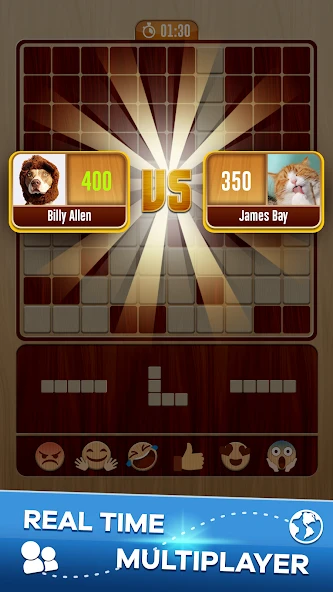
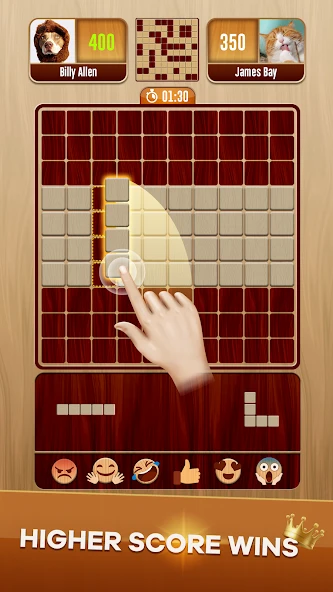
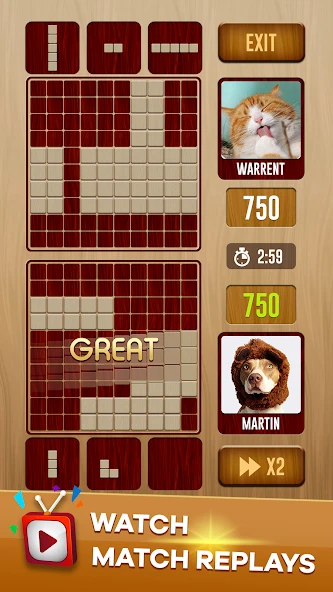
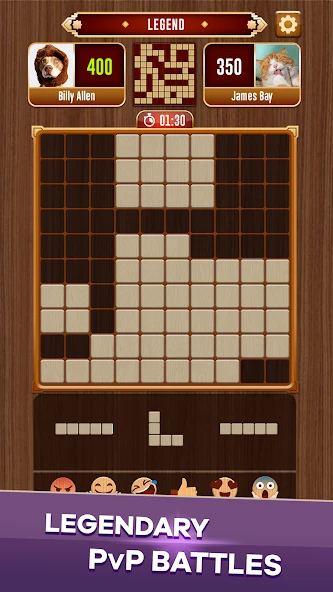
Woody Battle: Online Multiplayer Block Puzzle Mod APK brings infinite lives to fast, tactical block battles. Instead of waiting after defeats, you can immediately refocus, queue again, and improve your decisions. Each match gives both rivals identical random pieces, keeping victory tied directly to placement skill. Complete horizontal or vertical lines, earn ten points per clear, and protect valuable open grid space. Real-time opponent progress creates pressure, while replays reveal the placements that changed an entire match. Solo practice offers breathing room before you chase global rankings or challenge a specific friend. For Android puzzle fans seeking quick competition, this version keeps the rematches flowing without life limits.
About Woody Battle Block Puzzle Dual
Woody Battle Block Puzzle Dual is a competitive puzzle game for Android built around real-time one-versus-one matches. The listed support contact belongs to Athena Studio, while the game is presented by the Woody team. Both players receive the same randomly generated block set, then drag pieces onto a grid to complete horizontal or vertical lines. Every cleared line awards ten points. A match lasts three minutes, and victory goes to the first player reaching the target or the higher scorer when time expires. Solo Practice, friend challenges, global rankings, live opponent progress, and match replays round out the original Woody Battle gameplay.
Woody Battle Gameplay Guide and Pro Tips
The basic controls are simple: select one of the supplied shapes, drag it onto an open area, and release it. A complete row or column disappears immediately, creates more room, and adds ten points. You cannot rotate the pieces, so every placement should account for the remaining shapes. The round can end early when neither player has space for an available block.
- Preserve flexible areas: Keep the center relatively open and avoid dividing the board into narrow pockets. Large pieces become much easier to place when several connected spaces remain available.
- Review all supplied blocks first: Before dropping the easiest shape, inspect the entire set. A harmless placement can block the only suitable location for a larger square or long piece.
- Build in two directions: Arrange blocks so one move can advance both a horizontal and vertical line. Cross-clears recover space quickly and can create a useful scoring burst.
- Watch the opponent intelligently: Live progress can show whether a rival is approaching the target, but constantly checking it wastes planning time. Glance after completing a line or while evaluating an awkward set.
- Use Solo Practice deliberately: Practice keeping the board low and open rather than chasing every immediate clear. This habit reduces panic when the three-minute timer becomes tight.
- Study close losses: The replay system is most useful when you identify the first placement that created an unusable gap. Correcting that early mistake often matters more than copying a final scoring run.
Woody Battle: Online Multiplayer Block Puzzle Mod APK Features
- Infinite lives: The supported modification provides unlimited lives, removing the usual need to purchase extra lives after repeated matches. You can continue entering battles and practicing without exhausting a limited life supply.
- Faster rematch flow: A narrow defeat does not have to interrupt the session. Infinite lives let you apply a lesson from the replay system immediately while the critical board decisions remain fresh.
- More room for experimentation: Test aggressive line setups, unusual placements, or new board-management strategies without worrying that failed attempts will consume your remaining lives.
- Uninterrupted competitive practice: Players working toward stronger global-ranking performances can complete more consecutive matches. The mod changes life availability only; it does not claim unlimited money, unlocked skins, god mode, or altered scoring.
The unlocked feature documented for this Woody Battle APK is specifically infinite lives. Both competitors still receive the same block set during a match, and the familiar placement rules remain central to winning.
Why Players Love This Mod
Three-minute rounds make Woody Battle easy to start, but improving consistently takes repetition. That is where the infinite-lives benefit feels most relevant. A player can lose because of one sealed corner, open the replay, identify the risky placement, and return to another duel without managing a life counter. The rhythm stays focused on learning rather than waiting.
The competitive format also rewards calm decisions. Seeing an opponent score rapidly can tempt you into filling every available gap, yet protecting future placement space is usually more valuable than forcing a small immediate clear. Because both players receive identical pieces, the result reflects how efficiently each person handles the same puzzle. This makes consecutive attempts valuable for comparing routes, timing decisions, and reactions under pressure.
Players who prefer a quieter session can use Solo Practice before entering real-time matchmaking. Friend challenges provide a more personal contest, while replays help turn losses into specific lessons. These systems already give the original game strong replay value; infinite lives simply keep those activities accessible throughout a longer session.
How to Download and Install Woody Battle: Online Multiplayer Block Puzzle Mod APK
- Check the file details: Confirm that the PureMods page lists Woody Battle Block Puzzle Dual version 1.0.2 and the infinite-lives modification described here.
- Prepare your progress: If your existing installation contains progress you value, use any available account or in-game backup option before replacing it. Removing an older package can erase locally stored data.
- Start the download: Select the Mod APK download button and wait until the Woody Battle APK file finishes downloading. Download now from PureMods to obtain the file offered on this page.
- Enable installation permission: Open your Android security or app-installation settings and enable Unknown Sources for the browser or file manager used to open the package. Newer Android versions may label this option as permission to install unknown apps.
- Open the package: Locate the downloaded APK in your device's downloads folder, tap it, review the Android prompt, and choose Install.
- Launch and verify: Open the game after installation, enter a suitable mode, and confirm that the infinite-lives feature is active. If installation fails, check available storage and verify that an older app signature is not causing a package conflict.
- Restore the setting: After installation, disable the unknown-app permission again if you do not need it for another installation.
FAQs About Woody Battle: Online Multiplayer Block Puzzle Mod APK
Which mod feature is included in version 1.0.2?
The documented modification is infinite lives. No unlimited money mod, unlocked skins, god mode, removed advertisements, or scoring changes are claimed for this release.
Do infinite lives change the rules of multiplayer matches?
No rule change is documented. Players still receive matching block sets, clear horizontal or vertical lines, and compete for the target or highest score within three minutes.
Why does Android report a package conflict during installation?
An installed copy may use a different package signature. Back up valuable progress through any available option, remove the conflicting installation if necessary, and then reopen the downloaded package.
Can I carry progress from an earlier Woody Battle APK?
Progress transfer depends on how the existing installation stores data and whether an account or backup option is available. Do not assume locally stored progress will survive uninstalling the previous package.
How should I use replays to improve my score?
Look for the earliest move that created an isolated gap, blocked a large-piece area, or forced several weak placements. Fixing that decision is usually more practical than studying only the final seconds.
How can I check whether version 1.0.2 is newer than my installed build?
Open the app information screen in Android settings and compare its version number with 1.0.2. Review the PureMods listing before replacing your installation with any latest Woody update offered there.